


Information is one of the primary factors in all aspects. But when you define information, most of the replies would be it is a collection of words and some special characters. At this situation a question arrives. Is it possible to figure out everything in the form of text and special characters? The answers is definitely No.
So to overcome the problem, Google introduced its Google Image search in the year 2001. After receiving a successful replies from the users , Google came to an idea that for most of the queries the suitable answer is not text and a brief description, but a simple image or a collection of images would be helpful to satisfy the user. Initially Google handled 250 million images and now it is holding over 10 billion images. It is not the quantity of the image speaks, but the aptness of the image holds the key to the victory. For effective results Google has made some modifications in its Image SERP.
The enhanced features of the Google’s Image search are,
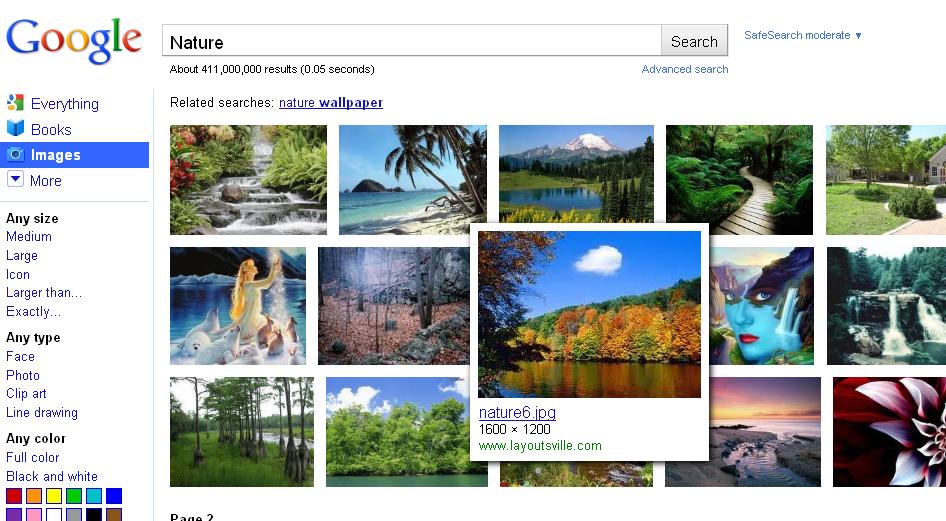
Dense Tiled Layout:
It is simply designed to see more number of images at once.
Instant Scrolling:
The core idea of this feature is scroll between pages. Now the user can get a maximum of 1000 images all in one scrolling page without losing the track.
Large Thumbnail Preview:
It provides a preview of the image which is designed for modern browsers and
with high resolution screens .
A Hoverpane:
It appears when you move the mouse on the image it provides a larger preview of the image and an information about the image.
New Landing Page:
It is used to display the image in the window. On clicking outside the image it moves to the site where the image is present.
Optimized Keyboard Navigation:
It is designed for faster scrolling with the use of keyboard shortcuts like Page Up/Page Down keys.
Nate Smith – product Manager – Google, said that “We see images as a major source of inspiration, a way of connecting the world—and their growth is showing no signs of slowing down. We’ll work to make sure Google Images continues to evolve to keep up.”
These changes gives the users not only a new experience but also makes the image search much easier now. With an advanced and sophisticated features, Google has made the search more simple.
Disclaimer: The post is completely based on individual thoughts and SEO Services Group bears no responsibilities for the thoughts reflected in the post.







Great goods from you, man. I have understand your stuff previous to and you are just too great. I really like what you have acquired here, really like what you’re saying and the way in which you say it. You make it entertaining and you still care for to keep it wise. I can not wait to read much more from you. This is actually a terrific site.
Everything is very open with a clear clarification of the challenges. It was really informative. Your site is very helpful. Thanks for sharing!
Great web site you have here.. It’s difficult to find quality writing like yours these days. I honestly appreciate individuals like you! Take care!!
Fabulous, what a website it is! This web site provides valuable information to us, keep it up.
It’s going to be ending of mine day, however before finish I am reading this fantastic article to improve my experience.
I’d like to thank you for the efforts you have put in writing this blog. I really hope to check out the same high-grade blog posts from you in the future as well. In truth, your creative writing abilities has motivated me to get my own, personal website now 😉
We stumbled over here coming from a different web page and thought I should check things out. I like what I see so i am just following you. Look forward to looking into your web page again.
I’ve been exploring for a little for any high-quality articles or weblog posts on this kind of space . Exploring in Yahoo I ultimately stumbled upon this website. Studying this information So i am happy to convey that I have an incredibly good uncanny feeling I came upon exactly what I needed. I so much indubitably will make certain to don?t forget this site and provides it a glance regularly.
It’s nearly impossible to find educated people on this topic, but you seem like you know what you’re talking about! Thanks
You have made some good points there. I checked on the net for more information about the issue and found most individuals will go along with your views on this site.
I know this website offers quality based articles and other information, is there any other website which offers these things in quality?
Having read this I thought it was rather enlightening. I appreciate you taking the time and effort to put this short article together. I once again find myself spending a lot of time both reading and commenting. But so what, it was still worth it!
This post gives clear idea designed for the new visitors of blogging, that really how to do blogging.
This paragraph is in fact a pleasant one it helps new net visitors, who are wishing for blogging.
Hi, after reading this remarkable paragraph i am too delighted to share my knowledge here with friends.
whoah this blog is fantastic i love reading your posts. Stay up the good work! You already know, many persons are looking round for this information, you could aid them greatly.
I love what you guys are usually up too. This kind of clever work and exposure! Keep up the good works guys I’ve added you guys to my own blogroll.
It’s awesome to pay a quick visit this web site and reading the views of all mates on the topic of this post, while I am also keen of getting familiarity.
Hey I am so excited I found your webpage, I really found you by mistake, while I was researching on Google for something else, Nonetheless I am here now and would just like to say thank you for a tremendous post and a all round interesting blog (I also love the theme/design), I don’t have time to read it all at the minute but I have book-marked it and also included your RSS feeds, so when I have time I will be back to read more, Please do keep up the fantastic work.
Wow, that’s what I was looking for, what a data! present here at this weblog, thanks admin of this web site.
I like the helpful info you provide in your articles. I will bookmark your weblog and check again here regularly. I’m quite sure I’ll learn lots of new stuff right here! Best of luck for the next!
Thanks a lot for sharing this with all people you really recognize what you’re speaking approximately! Bookmarked.
Hi there, You’ve done a fantastic job. I’ll certainly Digg it and personally suggest to my friends. I am sure they will be benefited from this web site.
Great beat ! I would like to apprentice while you amend your site, how can i subscribe for a blog web site? The account aided me a acceptable deal. I had been tiny bit acquainted of this your broadcast provided bright clear idea
I was excited to uncover this site. I wanted to thank you for your time just for this wonderful read!! I definitely liked every bit of it and I have you saved as a favorite to look at new information in your blog.
Thanks on your marvelous posting! I truly enjoyed reading it, you are a great author. I will be sure to bookmark your blog and may come back later in life. I want to encourage continue your great writing, have a nice morning!
If you are going for best contents like me, simply pay a visit this site everyday for the reason that it provides feature contents, thanks
Hi, after reading this amazing post i am as well delighted to share my familiarity here with mates.
I like the valuable information you provide in your articles. I’ll bookmark your blog and check again here regularly. I’m quite certain I’ll learn plenty of new stuff right here! Good luck for the next!
This is really fascinating, You are an excessively professional blogger. I’ve joined your feed and sit up for in quest of more of your magnificent post. Additionally, I have shared your website in my social networks
Excellent article. Keep posting such kind of info on your page. Im really impressed by your site.
Hey there, You’ve done an excellent job. I will definitely digg it and individually recommend to my friends. I am sure they will be benefited from this web site.
Thank you, I’ve just been looking for info approximately this topic for ages and yours is the best I have found out so far.
Hi there, just wanted to say, I loved this article. It was inspiring. Keep on posting!