


Google supports a number of advanced search operators that helps the user to make specific queries and doing some great help to SEO as well. Recently Microsoft’s Bing offers some advanced operators for effective searching. It contains some operators like site, intilte, inurl, define , AND , OR that are also found in Google and there are certain other queries which are more advanced merely absent in other search engines. Lets have a look at it and how it is effectively used.
1. site:, url: and domain:
These three operators may looks to be similar, but each have unique operations and have some restrictions as well. The “site:” operator shows approximately how many URLs are indexed by Bing fro a particular website ( similar to Google). And this query “url:” helps to show the particular url is indexed in bing or not. (as like ‘cache’ query by Google)

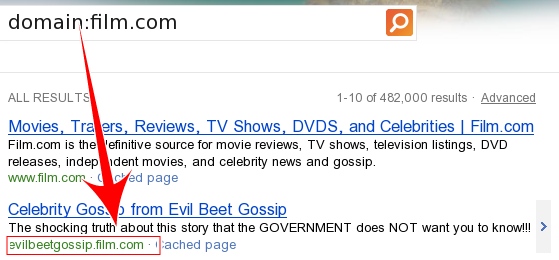
The operator “domain:” returns search results limits to particular domain and also returns any suffix matches. In below example for film.com , it also returns “evilbeetgossip.film.com” (this almost like “inurl:” query by Google.
2. contains: and filetype:
The Bing operator “contains:” gives web pages that link to other online documents and multimedia files like music and video whereas “filetype:” returns pages that created in particular filetype i.e It looks for content inside PDF and Office documents.
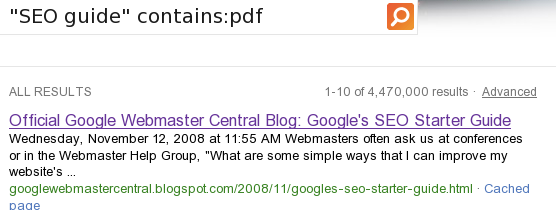

In the above example both results are from same domain, but “contains:” returns the particular page that contains PDF document, and “filetype:” returns the particular pdf file.
3. location:, language: and ip:
- The query “loc:” and “location:”, both returns webpages from a specific country or region for the particular keyword For Eg: “Software Company” loc:in that lists the software companies in India.
- If we need a results in particular language you can use the operator “language:” For Eg: “FIFA world cup” language:.de that lists the results of world cup in German language.
- The operator “ip:” returns the weppage that was hosted by particular ip.
4. feed: and hasfeed:
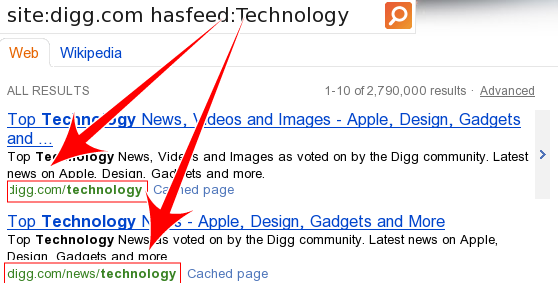
The operator “feed:” returns rss or atom feeds on a website for the particular term we search for, whereas the “hasfeed:” returns webpages that link to RSS feeds. In the below example, it returns digg pages that are about technology.
5. near: and norelax:
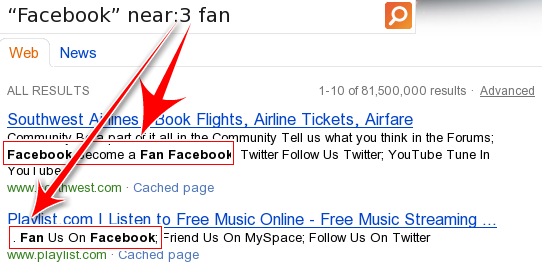
The “near:” operator searches for a particular word within range of another word. In the below example the word “fan” appears 3 letters after and before facebook.
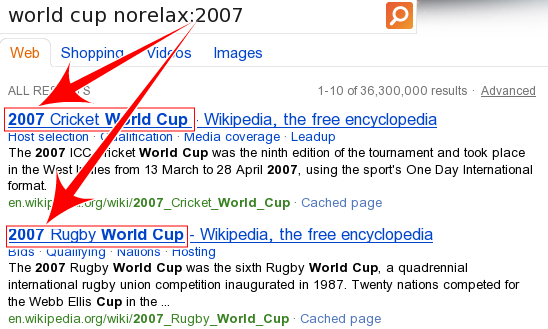
Consider a example “world cup norelax:2007”. Here it returns all webpages contain 2007 irrespective of any world cup.
I found these bing operators found to be useful and effective. If you use any other operator, feel free to share via comments.
Disclaimer: The post is completely based on individual thoughts and SEO Services Group bears no responsibilities for the thoughts reflected in the post.







does BING have an inurl: operator I’m trying to make this work in combination with other operators and it don’t seem to be working
inurl: operator is not working in Bing.com. You can find the full list of Bing's advance operators in the below link. http://msdn.microsoft.com/en-us/library/ff795620….
Thanks for the different tips provided on this weblog. I have observed that many insurance agencies offer clients generous discount rates if they decide to insure multiple cars together. A significant quantity of households own several motor vehicles these days, especially those with older teenage kids still residing at home, and the savings for policies might soon begin. So it pays to look for a great deal.
BING have an inurl: operator I'm trying to make this work in combination with other operators and it don't seem to be working
I am sure this paragraph has touched all the internet visitors, its really really fastidious paragraph
on building up new web site.
Hi there! I could have sworn I’ve been to this blog before but after reading through some of the post I realized it’s new to
me. Anyhow, I’m definitely delighted I found it and I’ll be book-marking
and checking back frequently!
I got this website from my pal who shared with me regarding this site
and at the moment this time I am visiting this web page and reading very informative content here.
If you would like to increase your knowledge only keep visiting this website and be updated with the most recent gossip posted here.